Using OEM Apple Bluetooth Module in PM8500 "Bertha"
Home Site Map Recent Activity PM 8500 Project Beige G3 Project Guest Book
Ass Covering and Excuse Section
THESE TIPS are for those who KNOW what they are doing (or think they do). You can easily fry your system doing this and if your system is under warranty then this will VOID YOUR WARRANTY (including the extended one). Do this AT YOUR OWN RISK. Pay attention, look, and make sure I haven't mistyped. Be gentle. Put the screws you have left over in a container...who knows, you might need them some day....Introduction
At one point I found myself with a spare OEM Apple Airport module that provides the build in Bluetooth for a PowerBook G4 along with its antenna. Guessing it was probably some kind of USB device I set about trying to use if in my PM 8500 Project computer. At the time this computer was using a MS Mouse Bluetooth dongle without any problems and with OS X native drivers.It proved to be no problem to connect the OEM Bluetooth module to any Apple computer (and presumably any PC) using a custom USB adapter cable. The most difficult part of arranging the antenna in the desktop case to get good range.
This is a VERY brief description of what I did.
Connecting the OEM Module.
The OEM Apple Bluetooth module is essentially the raw board like you would find in a USB Bluetooth dongle. It has a microsized connector which has the standard pins for a USB connection (1.1 - Bluetooth doesn't require 2.0 speeds) plus a connector for an antenna.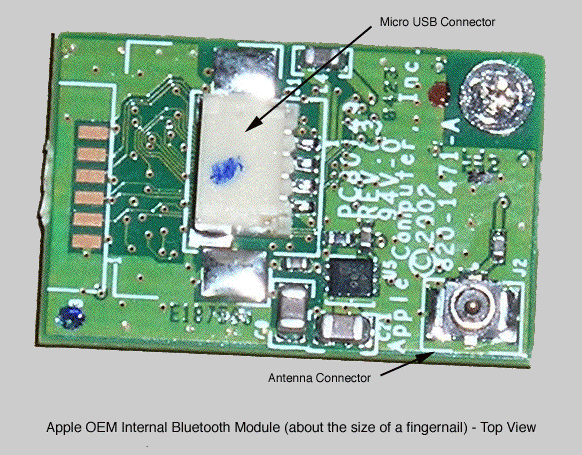
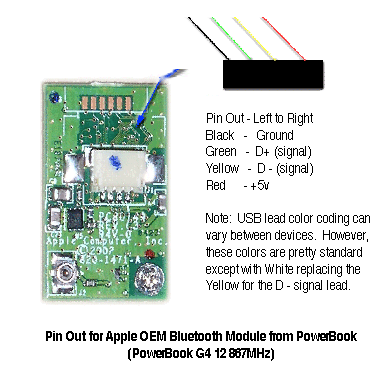
USB connections have four leads: Ground, +5v (to power devices as needed), D+ and D- (two signal leads). The Ground and +5v leads were easy to determine just using a multitester (voltmeter). The signal leads, when not using common wire colors, can be determined by triial and error. If you reverse them the device either doesn't work, or works wrong.
Wrong means things like backwords. For example a USB mouse with reversed signal leads will behave like you are holding the mouse upside down.
The antenna is just a fine gauge wire that connnects to the module and terminates in a circuit board (presumable to damn reflections and provide a fixed reference). The antenna from the PowerBook handled both Airport Extreme and Bluetooth, not surprising since both are 2.4 GHz technologies.
To create the cable for the connection I took a cheap USB cable, but it in half, and then connected it using wire nuts to the original connector that had been in the PowerBook (also cut). The spliced area was stabalized with a glog of glue from a glue gun.
The module was then mounted to a piece of empy circuit board (using a cored out barrelo connector as a spacer). The circuit board was bolted to the inside of the PM8500 case. The antenna was mounted on the front case cover with the two terminal leads (the ends) running up the ouer portion of each site.
The custom USB connector was connected to one of the two USB 2.0 ports provided by the Sonnet Trio PCI card. The other port was connected to an internal USB 2.0 hub (powered) that served all other USB needs.
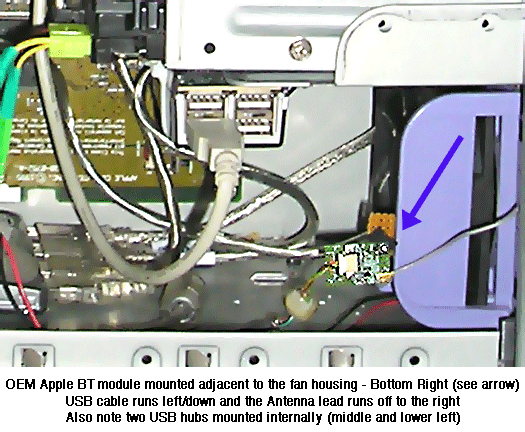
A dedicated port was utilized since the primary input devices (mouse and keyboard) are Bluetooth and this minimized and/or elimated any lag or failures from bandwidth problems.
Counter Display Suspended by Page
Created 5/20/05