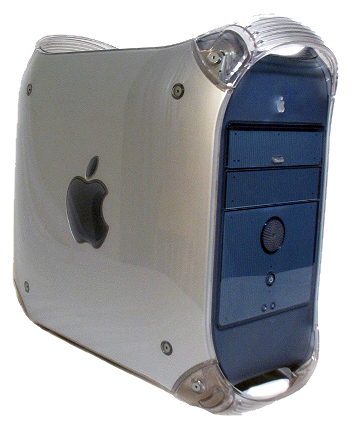
Considering that getting the original 1995 PowerMac
8500 back running is going to be an involved project
and I have handed off all of it’s duties to the slightly
newer 1999 PowerMac G4 AGP, I thought I might
dedicate a page to those.
To skip to the useful tips on making the PMG4 AGP work, go here.
PowerMac G4 AGP "Gray Lady" as currently
configured:
Mac OS X 10.4.11
Sonnet 1 GHz G4 CPU upgrade
800 MB RAM
1 TB SSD
2 TB HD
AGP ATI Rage Pro 16 MB card
Sonnect ACARD 6280M PCI ATA 133 video card
Adaptec 7850 PCI SCSI card
First a little discussion about the PowerMac
G4 AGP.
I have a relatively coherent, if typo-laden, discussion of
the different Macintosh generations in the late 90s and early
00s at Choosing Legacy Hardware
to Upgrade for Play or Work, What to Get and What to Avoid
in which I essentially conclude that, at that time (mid
2005), the PowerMac AGP G4 was the
slightly-older-used-machine of choice.
That is likely true in that the G4 AGP machine is about as old
as you want to go if you want Mac OS classic support, easier
upgradability and at least some compatibility with the modern
world, but don’t want the hassle of the truly old Macs. It has
PCI slots, native USB support, native ATA support, and DVI
video out. This means a world of used PCI cards, modern
keyboard and mouse support, including for startup options, caveat-encumbered support for modern hard
drives and SSDs, and support for the use of modern monitors
with a cheap DVI to HDMI adapter. The PCI slots allow easy
addition of USB 2 ports and more modern ATA cards (although
you almost certainly need to find those used). These
machines are not special nor old enough to be valuable so they
are cheap. Unfortunately they are not new enough to be really
useful which makes them cheap.
So, if you have one they are a worthy project, and a much
easier one than a Mac two generations older, which will
require harder to get peripherals such as ADB keyboards, and
is much faster and more upgradable then a Mac even one
generation older. They also natively support booting into both
OS 9 and OS X and support running classic apps in OS X. So it
is a good choice to be able to run older classic Mac apps but
with at least some of the stability of OS X and the
maintainability of a more modern platform.
For the PowerMac G4 AGP the big downsides
are:
- Built in ATA 66 controller does
NOT support drives bigger than 128GB and, in solidarity with
their older brethren, will reliable corrupt larger
drives given time. You can partially work around this by
using Intech’s
ATA HiCAP drivers, which requires your partitions to
be <128GB and your boot partition to the be first one,
but will allow you to see the rest of your drive. This
is true until the very end of this generation of Macs in
around 2003 when they got ATA 100 controllers and can see
larger drives.
- Rage 128 Pro video standard, which does not support
higher resolution monitors or Quartz Extreme. Getting a Mac
version of a card that does support QE is expensive, and
modifying a PC Card is doable but complex. Support for QE
can result in significant speedups by shifting much of the
basic graphics work of supporting the OS to the video card.
The next model came with an option of a better QE
compatible video card, and they were standard after that.
- Version of Safari that is available on the most
recent supported version of the Mac OS (OS X 10.4.11) is
essentially worthless on the modern internet.
- Most recent supported version of Mac OS is OS X 10.4.11.
Mac OS X 10.4.11 was a massive upgrade from O X 10.3. OS X
10.3 is where Apple essentially finished a long public beta
and 10.4 is when the Mac OS began to move forward. It is
usable. Mac OS X 10.5 is another huge leap forward and
is much closer to our current Mac OS. Mac OS X 10.5 feels
modern.
So my recommendation is, you can absolutely make the
PMG4 AGP work, and much easier than a PM8500, but if you are
wanting an older Mac computer, that is cheap, easy to make
work, has support for the modern world such as USB peripherals
and larger hard drives and SSDs, has a much better (standard)
QE compliant video card, can run classic apps (in OS X 10.4 or
natively booted into Mac OS 9.2), and can also run Mac OS X
10.5, then get either a later PowerMac G4 Quicksilver, or
one of the PowerMacG4 Mirrored Drive Doors. Those
are still computers that are more than 20 years old and are
only $200 to $300 as of 1/2026.
1999
PowerMac G4 AGP tips.
Operating system:
You can boot the PMG4 AGP into a later version of OS 8, or any
version of OS 9, or OS X 10.0 through 10.4. It can run OS X
10.5, and does so without problems, but that is not a
supported install, and doing so requires either hacking the
install CD, or just copying a working installation from a
newer PPC Mac with a working 10.5 install. Mine has a working
10.5 install, dating from 20+ years ago, but it is a bit pokey
on the G4 AGP, and although is has a much never version of
Apache (v2.2) and a version of Safari which will at least load
pages on the modern internet, it was too slow for me and I am
running 10.4.11.
ATA controller:
It has built in ATA 33, which is really meant for optical
drives, but can run smaller ATA drives. It has built in ATA 66
for the hard drives but only has 28 bit addressing and cannot
see drives larger than 128 GB, which really means it can only
see the first 128 GB of any drive, then it corrupts the drive.
You can plug a modern SATA drive into the bus using a cheap
SATA to ATA adapter (available on Amazon for less than $10
as of 1/2026).
There are several solutions for this hard drive limit:
- Use drives smaller than 128 GB (any modern smaller SATA
SSD will work fine)
- Use a larger drive divided into 128 GB partitions, keep
you boot partition as the first one, and install the Intech’s ATA
HiCAP drivers (until Intech yells at me I will
mirror them here).
- Install an ATA 100 or better PCI card. This will allow you
to see any size drive you want, and if you get a Mac
compatible one, you can boot from it. I have an Sonnet
branded ACARD 6280M ATA 133 PCI card and it works great. I
currently have a 1 TB SSD and a 2 TB HD, both bootable into
both Mac OS 9 and Mac OS X.
Hard drive gotchas.
You cannot (apparently) connect more than one SATA drive to
each ATA bus, even though they would support two ATA drives.
You cannot connect both an SATA drive and an ATA drive to the
same bus. When using SATA: one bus, one drive.
USB:
The built in USB is slow, 1.1 and 12Mbps. You can add a USB
2.0 PCI card that is fast enough to make USB drives (hard
drives and USB drives) usable but you cannot boot off them.
You can boot from the built in ports…at 12Mpbs.
Video Card:
The older Sawtooth PowerMac G4 came with ATA Rage Pro 16 MB
AGP cards, which are too small to see anything larger than a
1024 x 768 monitor, and too primitive to do Quartz Extreme.
Solutions:
- Don’t waste your money on a monitor that has a resolution
larger than 1024 x 768 and just use the included video card.
- Get an old Mac AGP video card and enjoy larger monitors
and QE (expensive)
- Get an old PC AGP video card (carefully selected),
replace the ROM chip with a larger one, flash it Mac, enjoy
larger monitors and QE.
Note that for a couple of generations after the G4 AGP
the PowerMac used non-standard video cards and connectors
that carried power for a monitor. Be sure you know what card
your system uses before you try to upgrade it, or modify a
connector.
I chose door number 1. I am almost certainly going to try door
number 3 because…of course I am. When I do that I will l
document the process in detail, and link to any equipment or
supplies I needed.
Web Browsing:
The OS X 10.4.11 version of Safari (apparently v3.0.4) does
not support the modern security architecture that basically
the entire modern web demands. The vast majority of sites just
flat refuse to load. The ones that do are...slow. The
best solution I have found is AquaFox.
This is basically a less ancient version of FireFox for old
PPC Macs that appears to be being actively worked on and will
load sites. Don't get me wrong, this is still a limited
option. AquaFox's support of the current web is limited*,
and it is very slow compared to a modern web browser on modern
hardware.

Networking:
The PMG4 AGP came with a built in RJ45 10/100 Ethernet port.
Some came with built in Airport (not mine). The best bet for
getting online is to use the Ethernet port, either via a WiFi
bridge, or directly.
I hope anybody finds this useful.
*I think this is one developer trying to maintain the
home fires, which is challenging. I salute him as otherwise we
would have no options. Please show your support!