Is the Macintosh Different? Only If You Care.
Home Site Map Recent Activities PM 8500 Project NMS Software Guest Book
Introduction
I am a Mac user and, like most Mac users, I prefer Macs for real reasons and not just out of habit or some odd snobbery. I have used PC’s extensively, worked on them, even written programs for them and my opinion holds. I believe the Windows OS user interface is lazily designed and functionally inferior to the Mac OS with many choices that are not just different but really bad, or worse, reflect no choice at all.* Windows has a made-by-committee look that simply cannot be explained by any hardware issues or any constraint that Windows might have. My assumption is that this mediocrity reflects both a lack of focus on usability and GUI issues, plus Bill Gate's general fascination and enthusiasm with technology.
It is one of the ironies of my life that I am a loyal if not obsessed Mac enthusiast, but I am quite sure I would much prefer to hang out with Bill Gates than Steve Jobs. Bill Gates would be exited about any cool techy stuff. I doubt Steve would be as earthy.
Apple has a very carefully thought out set of user interface guidelines that users expect software makers to adhere to. These guidelines are based on real research, thought, with a focus on including a limited of set elements that work well together (as opposed to more elements). The existence, quality, and use of these guidelines are a central factor in the Mac user experience. This much more careful and sane approach to interface design makes it likely that almost any user would have far fewer headaches and be more productive on the Mac OS, all things being equal.
Most PC users with just a tiny exposure to Mac’s don’t appreciate these differences since a user has to be sophisticated or attuned to them to notice them. The hassle and hostility difference takes time to appreciate. It is much like wine tasting. Unlike wine tasting you do not have to know the differences exist to benefit from them, but that benefit takes time to see even if its just a feeling. Few users would notice the benefits if they had only limited time on a Mac and away from a PC (the “I used a Mac one a couple of years ago and hated it?” statement, is sort of like “I drove thru the edge of Nevada once and that state sucked”). It is a truism that almost any user with significant time on a specific computer will dislike a different OS, no matter how much better it may be, as it is different from what they know and therefore harder, and slower (this also works when exclusive Mac users end up on PC’s for a short time but the reality is that PC’s are so common most Mac users are quite adept at using PC’s). Many Mac users hated OS X at first because it felt so much less natural than OS 9 and it took some time for the habits to break, and the choices behind decisions in OS X to become apparent. Now I don’t know anyone who continues to suggest that OS 9 has a superior GUI to OS X (opinions on isolated points not withstanding). Nothing is ever intuitive if your already know how to do it another way.
How A Macintosh Interface Differs from a PCs (or Detail Really Counts)
To illustrate how Windows and the Mac OS differ I will use a simple but common example that most users never notice but happens every day. On the PC users would just waste much more time on the PC than they would on a Mac and have an overall more negative impression of their interaction. In other words, Mac users regard their machines with an odd sort of affection; PC users see theirs as tools.
This
following is similar to the example provided on the Mac Developers page
about UI Guidelines.
Apple has figured out and clearly explained to developers how to construct dialogs that require user interaction. Part of that concept is that dialogs need to briefly explain the issue, then have the buttons (choices) labeled with Actions and almost never with Yes and No. The goal is to speed up and make clear how to proceed with what you want, not to determine the ultimate yes/no balance of a statement as related to ones goal. With Actions a user can tell with just a glance which button to press, but with Yes or No that user has to carefully read and parse the entire dialog to determine which choice leads to the desired action, and then may still get it wrong.
These are generic examples and not from specific cases.
Typical Windows:
The network drive cannot be found on the network and the file could not be saved remotely but can be saved to a local drive. Do you want to cancel saving this file?
<No> <Yes>
Typical Macintosh:
The remote volume has been disconnected or cannot be found. Would you like to save this file to a local drive?
<Cancel> <Save on Local Drive>
The Apple dialog and choice is clear at a glance with no question as to what you are choosing when you click a button and often users will not even need to read the dialog. The meaning is often obvious in context. Contrast this to the PC where you must carefully read the entire dialog to figure what question you are answering yes or not to, and what yes or no means. Another benefit of Apple’s method is that developers seem to be more sensitive to such issues with overall cleaner and clearer dialogs than Windows, even dismissing concerns over button labeling rules. They seem to start caring. On Windows dialogs are written seemingly at random so you really do have to read the entire text and not assume that the question would be asked such that <Yes> or <No> had a certain meaning. The fact that most users would choose to <Save on Local Drive> in the above case and saving is clearly the safer default will not prevent the Windows software from asking the question so <No> is the answer to proceed to do what you had originally started to do, to save the file.
To those who say, what? It only takes a couple of seconds longer so who cares, I say, use a PC, and waste countless of your seconds every day on this any many other similar stupid decisions. Windows doesn’t care either.
Sadly, this is example is charitable since given the nature of its Windows its dialogs are longer and more dense, like the one below.
The installation program has stopped due to a possible error. The driver FT8390.dll is newer than the one currently installed but that driver is currently in use. Replacing the driver could cause loss of function. The new driver will not be available until after Windows is restarted. Would you like to continue installing?
<Yes> <No>
Here the user is helpless. They have to read, probably multiple times, a complicated dialog which in reality they have no way of responding to. Who knows what FT8390 is or does? What choice does the user have if presumably the software being installed needs this thing and this user needs the software? As a further insult we think it is likely that choosing <Yes> actually replaces the driver but it is not really clear, only that <Yes> continues the install, which is yet more worthless worry since we don’t really have a choice anyway.
So the user gets to waste time parsing a seemingly important dialog and increase their anxiety over an unclear question on a scary subject for absolutely no reason since they have no choice in the end.
If changed to a Mac our intrepid user might never notice this type of anxiety was much less common but only feel slightly less angry each day. A Mac user experiencing this on a PC would see this as a sign of how hostile and difficult PC’s were to use, and how much less frustrating Macs were. Many or most Mac users would not realize that this interaction is not fundamental to PC technology but just a difference in the care and thought that went into the user interface design and that it reflects the basic truth of MS and many Window’s developers. They just don’t care because it’s good enough. It isn’t meant to be great, just usable.
This type of interaction is common and when I am forced to deal with it the experience usually sends me into a raging tirade something to the effect that ‘it was not my choice to use Windows so fix your own damn system’, and then I often take pity and suffer a bit longer.
How about an example from the real world!
If I am going to pick on an OS "for real", then darn-it-all, I am going to pick Apple and OS X. MS is supposed to be sloppy, Apple isn't.
Below is screenshot of a dialog box from iPhoto 4.x running in OS X 10.4.1 and a perfect example of a poor dialog and a violation of Apple's user interface guidelines. iPhoto is the photo importing, archiving, and management application that come bundled with all Macs and with OS X.
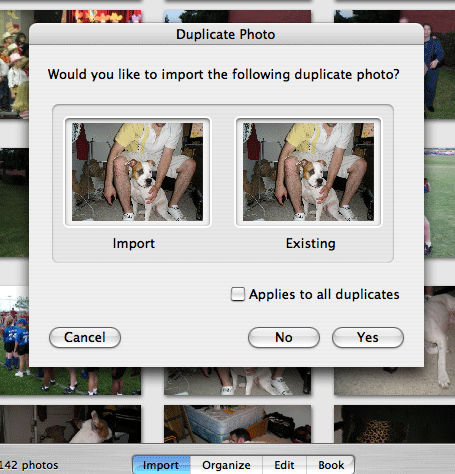
If you just casually read this dialog while keeping in mind that you are being asked to decide whether to replace (lose) photos on your hard drive you will find it takes about 5 to 10 seconds figure out what the right answer is based on what you want to do. It should take about 1 to 2 seconds.
The dialog starts with a Yes or No question concerning (more or less) do you want to delete some photo stored on your computer. This requires you to carefully read and parse each word of the question to determine what you are responding to since possibilities for Yes include "Yes, keep the photo currently on my computer", "Yes, replace (delete) the photo currently on my computer", and "Yes, don't replace the photo but give it (or the new one) a new name", etc...
Then you have two pictures, one labeled with an action (verb ), the other labeled with an adjective that together seem like they form a question phrase hovering above the Yes and No choices.
Remember, this dialog does not just casually present itself on some web site, it pops up in the middle of some task (clearing your camera so you can take new pictures) and must be cleared for you to continue.
This is several seconds of stress and wasted time by thousands of Mac users each day avoided by just a few extra minutes of programmer effort and attention.
Windows users may look at this and again say, big deal, but it is this type of interaction, 100 x per day that makes using a PC so much less pleasant. (The remote JUST prevents from walking 10 feet to the TV, the pop top soda can JUST prevents a few extra seconds using a can opener, etc...)
In reality Mac users are so unaccustomed to this type of interface shortcoming that to us it sticks out. Using windows is like needle torture.
OK, I am not an interface design Guru and I don't pretend GUI design is easy or that I can or should being doing it, but lets give fixing this a try.
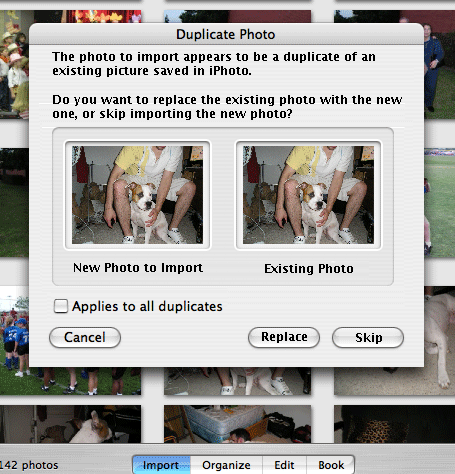
This effort is far from perfect, or even
correct, but hope at least it is better. Clearly the entire
dialog needs to be resized large and the text given more breathing room
but for this purpose good enough. In attempting to improve it I had
three changes: 1) I tried to improved the main text to give actions
rather than a yes no question, 2) the buttons are now actions that map
to the question, and 3) the label under the photo samples should be
more clear in meaning.
Yes, even
Apple screws up. Believe or not us Apple-nuts spend our time keeping
our platform clean, not moaning about Windows.
And don’t let me get started on Microsoft's dismaying choice to provide wizards for system configurations instead of fixing Window's awful and confusing control panels.
Am I
an Apple Apologists?
So, is Apple infallible and MS
evil…of course not. I can rage at an Apple
decision like no other. Nor do I hate MS products because
they are from MS. I will use any MS software I think is
better. Sounds like empty talk since a Mac nut like me
wouldn’t really give anything MS a try, just pretend to and
then look for reasons to hate it, which anyone determined will always
find? Actually, I am a big fan of MS’s Mac work
(from the MBU) and have been very loyal. MS is a very good
Apple developer and one of the oldest, if not the oldest. MS
Word and Excel were completely dominant on the Mac when Word Perfect
and Lotus reigned on the PC and I swore by the MS products.
MS is an aggressive supporter of core Apple technologies, including
unique ones, and was big and early in coming to the party when OS X was
young. I think the support MS showed made a
difference. I am a big fan of MS Office (excusing the
abomination that was Office 6), bought it, and most of this web site
was authored on it. I used Netscape from 2 until 4 but kept
and eye on Internet Explorer. With the release of IE 4 and
until some time into OS X (I. E. was at 5.1 with 6, although rumored
ready, never released) I thought it clearly the best Mac browser, and
much better than Windows IE. It is not a competitor anymore
as development ceased years ago and will not resume since Apple has
made such a strong showing with Safari, but I sure was looking forward
to giving the next version a try. I still miss some features
of IE:Mac. Ignoring the bad interface on Windows NT (now
improved somewhat with XP) I enjoyed the stability and process
management it offered and coveted the ability to kill processes so
easily in the days prior to OS X. I don’t like the
Start Menu implementation (well, hate it) but see clear uses for
something like it (the Mac has nothing like it) and have even written
something similar for personal and friend use. I believe that
most new users are helped by having all the programs, including new
ones, added to a single menu they understand and actually look at, and
I like having programs added to an appropriately pruned and organized
menu as well (I should note that using the term programs is killing me
since on Macs they are Applications). I will almost refuse to
use anything but a MS mouse and I own seven of them, three
wirelesses. The only thing wrong with my Bluetooth mice is
the lack of MS drivers to correct Apple’s horrible scroll
algorithms.
I do think the Windows OS is overall a lazily designed and functionally inferior implementation from the standpoint of user interaction and usability when compared to the Mac OS, but I do not assume any designs or different decisions it contains are automatically bad or inferior to the Macintosh OS. I also understand there are tradeoffs in the marketing, business, and design choices between Apple and MS with advantages on either side. For example, when comparing both sides as to a Mac’s much better hardware and OS integration, longer useful life, and less hassle OS upgrade experienced one must realize that this necessitates Apple retaining control over the hardware with products that reflect a more limited integrated set of choices than the PC world. Macintoshes usually have proven well thought out technologies likely to be fully and completely supported by Apple for some time. The downside is more limited choices of hardware technologies or combinations with products that are often more expensive, and with some technologies not yet available. Furthermore the cutting edge of hardware, potentially better but not yet completely worked out or integrated, usually comes later to the Mac. For PC’s the large number of hardware vendors and variety of options, plus intense competition, makes machines cheap, very customizable, and with choices of truly extravagant hardware available. The downside is lots of conflicts, and a complexity and a testing requirement for the OS beyond the hope of even MS. Such an unpredictable array of possible configurations means that regardless of how hard MS works hardware problems will always be very pronounced and users will be tentative about experimentation. *
* I am actually
rather impressed with Windows level of hardware support and I have had
good luck with its ability to locate and download device drivers. For such a difficult
support task they have done pretty well I think.
For waaay
too much discussion on driver issues see ** below.
Apple Had Better Keep Up the Work If They Want to Keep Me, and Microsoft Still Has No Excuse
Think MS and Windows are off the hook and I am some namby pamby “Your Ok, I’m Ok…been to Mars?” Windows apologists? Think again, and think about what any of this has to do with the example I gave about well written dialogs and controls and what possible excuse Windows has for such clear, well documented and clearly bad decisions of which there are countless others. Apple and the Mac ‘ain't in no way’ perfect and I am under no illusion that Apple wouldn’t steal and sell my kidneys if it was legal and made them money, but I know why I made my choice and that my remaining an Apple user is dependent on Apple not taking me for granted.
Like many Apple users, I pay attention.
** A
Discussion on Device Drivers in Windows and OS X
OS X and Windows deal with “Plug and Play” and OS support of peripherals differently and those differences can be interesting to consider as they suggest differences in approach, focus, technical demands, and philosophy.
The device manufactures provide the required device drivers some percentage of the time and the OS provides generic drivers some other percent of the time in both Macs and PC’s. These drivers are as a separate install or download, or sometimes bundled with the OS. In general Windows bundles with fewer drivers and instead depends on either the user to install device drivers when they install a peripheral, or Windows to download and install those drivers from the Internet. Sometimes drivers, or some generic equivalent, are present on the Windows with the requirement of accessing the Windows CD meaning that if the CD is unavailable that avenue is unavailable.
OS X takes a different approach. Instead most device drivers, even if just in generic form, are part of every install of OS X such that many or most devices work immediately when they are plugged in without any required driver identification, install, or system for the user to contend with. This is true Plug and Play. No, plugging in a device, using an install CD, and then restarting IS NOT Plug and Play.
This huge difference in approach reflects philosophical, technical, and pragmatic differences.
Windows approach is, among other things, a heavy concession to the programmatic and technical side and reflects the huge variety of different hardware (and different system configurations) that the OS supports and the large problem of conflicting drivers, along with difficulty selecting the correct driver. Windows works to reduce problems and decrease user hassle by having the OS locate and install drivers automatically based on technical rules. This also tends towards the system having the most up-to-date driver available which helps mitigate conflicts. MS has done a generally outstanding job of addressing such problems and I see no reason to believe that Apple would do better if faced with a similar task. Many of the driver conflicts that affected prior windows version are minimized or eliminated (along with most DLL conflicts) . . . Thank God!!!.
The philosophic side is really a reflection of where Apple and MS have focuses. Device makers are used to providing. and users somewhat expect, device specific software packages accompanying many types of peripherals, with interfaces and functions different from other software packages included with other like devices, and with drivers sometimes only compatible with the included software. This tends to makes MS’s push towards consolidating common functions into the general Windows interface, like managing photos, more difficult. The UI is also impacted as companies try to help distinguish their products by adding FLASH to the software packages instead of more boring usability and UI enhancements.
Apple’s pragmatic and technical considerations are very different. Driver problems, although certainly far from uncommon, are much less a problem on the Mac OS as is selecting the correct driver. Driver problems when they do arise tend to be reflected in a device that either does not operate at all, or with a simple kernel panic when the device is activated. Only rarely are cross-device problems encountered.
Kernel panics are the Macs version of a hard crash. Device drivers have direct access to the kernel without the memory protection afforded other processes and therefore when they misbehave they often cause the kernel to crash. This means device problems are usually not sneaky. If every time you plug in your new joystick the computer freezes, it’s a device driver problem.
What is much more of a concern for Apple is actually HAVING device drivers available. With the Mac market so much smaller many peripheral makers resist production or customization of these large software packages and the obligatory tech support (now cross-platform) that would entail. Apple’s solution is to provide well done standard software packages for most routine consumer needs as part of OS X that support the use of these common devices thereby freeing the device manufacturer to provide only the base hardware drivers if not already supported via generic driver support. Most tech support is related to actually doing something with the device and not just getting it connected so the tech support is largely transferred to Apple as well. Apple tends to take these drivers, which are based on a standard I/O foundation, and bundle them as part of the OS. Many or most of the drivers bundles as part of the OS are supplied by 3rd parties. This allows Apple to greatly increase the peripherals available for Mac users, and goes a long ways towards avoiding the historically higher cost of Mac peripherals given the fact that many peripherals are bundled with Windows and Mac compatibility in the same box.
Examples: The standard OS X install provides support for almost any mouse, keyboard, digital camera, and most printers such that often those devices can be used immediately without having to dig out a disk or connect to the Internet. A good example of this is my MS Bluetooth mouse. To use with windows you had to install an OS update plus drivers and had the requirement of using the supplied MS Bluetooth dongle. Built in Bluetooth was not supported. When I purchased the device (which specifically denied Mac compatibility) the MS mouse was immediately recognized by and functional on all my Bluetooth equipped Macs, and when the MS Bluetooth dongle was connected a Bluetooth setup assistance immediately launched and setup the device automatically.
So, what are the upsides and downsides of these different approaches?
Looking at it from the Mac point of view, the Apple approach enormously simplifies end user installation and configuration of peripherals and achieves a high degree of true plug and play. Additionally, having most (consumer) devices use a standard set of interfaces means Apple can truly refine those programs to make the Mac user interface and end user experience as integrated and pleasant as possible. This allows Apple to create a system that is more effective at allowing its users to use peripherals like digital cameras quicker and result in more satisfaction. Of course by its nature this allows Apple to stay ahead of MS in moving such functionality into the OS as a core function.
OS X Examples: iTunes for song management and CD ripping, burning; iPhotos for digital cameras with Image Capture evolving to manage all imaging hardware including scanning, remote control and internet sharing; Finder and Disk Utility for general optical burning, etc…
The downsides consist of two types the first being obvious. Since a goal of Apple’s approach is to mitigate against the tendency of device manufactures so forgo Mac support it is not surprising that not all devices are available to Mac users, even ones where Mac support would be likely.
The second downside is one of pure functionality. Device manufactures do not distinguish their offering solely through software, but certainly hardware differences are often even more important. Many of these differences do not impact the interface, or are taken care of by the drivers, but some do have special features only available in the specific software packages that match the device. Mac users, while still being able to use the device, may have more cumbersome or even non-existent access to these other features.
Comments: This seems to be less an issue than it threatened to be, although examples of it can be found, it's not common. Most functionality is addressed by the drivers (such as with printers or optical burners) or the bundled OS X Applications are often sophisticated enough to address the features as needed. Most devices with advertised Mac support and functionality not addressed by the OS X bundled applications do include their own packages. Lastly most truly high-end devices are designed for use with professional software that users expect to purchase separately, and many regular users who begin exploring advanced features of devices, be it on a PC or a Mac, quickly advance beyond the included software and progress to one of the many intermediate software packages available for both platforms.
My examples: My MS Bluetooth mouse has 5 buttons and a scroll wheel (one button in the scroll wheel) but the generic Apple mouse system configuration panel only uses the scroll wheel and the right and left buttons leaving the other buttons unavailable. The drivers do see all the buttons since some specific OS X control panels do allow you to assign functions to them, although the options are limited to those the control panel pertains too (the general ability to assign these buttons does not exist as part of the GUI even though the OS obviously sees the hardware; that capability is generally provided by mouse specific drivers). My Olympus D-580 Zoom camera supports the automatic stitching of appropriately exposed photos to create panoramas, but doing so (automatically) requires the use of the supplied Camedia software package. However, the interface is SO HORRIBLE compared with iPhoto it is almost misery to use and it took me about two days to run into its limit of three photos per panorama and thus my immediate return to iPhoto with Photoshop Elements for editing, and making panoramas.
One standout difference where Windows XP is often very impressive is on the occasion of having a supported device without drivers already installed or an available installation disk (this would be uncommon for users specifically purchasing new supported devices). For Mac users this necessitates a trip to the manufactures website to determine if the device is supported (if that is in doubt) and then effort to identify, download, and install the drivers. Using Windows there is a good chance that immediately upon plugging in the device the OS will locate, download, and install the drivers and often offer to setup the device. When this works it saves the user a lot of hassle and gets the them up and going quickly. This is an area where MS’s efforts and focus have paid off and they deserve credit. No such system for automatically downloading and installing 3rd party drivers exists in OS X as part of the bundled OS, and I am not aware of any software offering such service.
The overall difference can be summed up this way (stating the benefits): Apple gets to have easier, more user friendly (and thus useful) interfaces to supported devices with an overall advantage in software/hardware integration even with 3rd party peripherals. PC's get access to a wider array of devices and device capabilities, often cheaper when a device is available for both Mac and PC, and PC's often have cutting edge technology first.
So, when considering this limited issue of device support, which is better, Apple or PC? For me that answer can vary and really depends on the specific needs of the user in question. Both Apple's and MS's approach seek to play to those strengths inherent in their respective markets while attempting to reduce the downsides that they also inherit. Given a specific user I can certainly usually give an opinion, otherwise I have to call it a draw.
Counter Display Suspended by Page

Created ?
Modified
11/19/2004
Modified 06/09/2005 - A few changes for clarity
Modified
06/17/2005 - Counter, Appearance, trans to Nvu, iPhoto example
Modified 12/07/2025 - Minor cleanup