Upgrading a New iBook G4
(Bad ideas that worked out anyway)
Home Site Map Recent Activity PM 8500 Project Beige G3 Project Guest Book
Introduction
You would think risking voiding the warranty on an $1100 laptop less than two months old would cause us to think twice about ripping it apart and swapping out key components with possibly damaged ones, and it did. Curiously I decided to go ahead and do it both times...joke...eh...nevermind...
Specifications: Before and After
Before:
iBook G4 1 Ghz with 12 inch TFT display, 768 MB DDR 266 RAM on 133 Mhz bus, 30 GB ATA 100 HD, 24x16x8 CDRW/DVD-ROM, Internal 802.11 G Wireless, USB 2, FW 400, 10/100 Ethernet, V92 Modem, VGA/RCA/S-video out with dual monitor support (hacked), Audio in/out
After:
iBook G4 1 Ghz with 12 inch TFT display, 768 MB DDR 266 RAM on 133 Mhz bus, 60 GB ATA 100 HD, 24x16x8x4 CDRW/DVD-RW, Internal 802.11 G Wireless, Internal Bluetooth, USB 2, FW 400, 10/100 Ethernet, V92 Modem, VGA/RCA/S-video out with dual monitor support (hacked), Audio in/out
Drive Upgrades (Hard Drive and Optical Drive)
Upgrading the HD was easy, of course, given that I had already cracked open the case for the Bluetooth upgrade. Upgrading the optical drive was only a bit harder since I had to repair the salvaged drive which involved straightening the case and ultimately replacing the top of the case with the one from the CR-RW removed from the iBook. I just got lucky that the mechanism was not damaged. I have also posted some tips on taking the iBook apart.
Bluetooth Upgrade
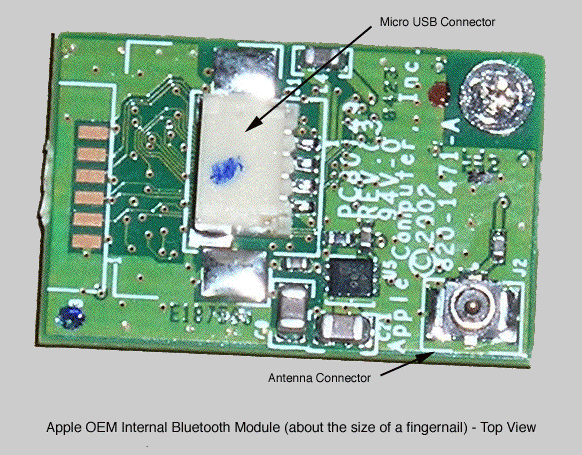
Having a dead PoIrBook G4 12 inch, the victim of an unfortunate accident, I decided to see if I could use its internal Bluetooth module to upgrade a new iBook G4 that did not have the Bluetooth option. Despite the warranty voiding risks our hatred of dongles prevailed and I proceeded. My wife did most of the disassembly with the installing and re-assembly done together.
My original assumption was that the Bluetooth modules, little fingernail sized devices made by D-Link, Ire installed by BTO technicians prior to shipment in the purchased iBook and that all new iBooks included the connectors (poIr and antenna) but lacked the module. This seemed to cheapest way to mass-produce the machines. After perusing several highly technical and hackerish sites all of which insisted that adding internal Bluetooth after the fact was impossible I began to question this assumption but since the reason given was an inability to get the Bluetooth module as an individual order I thought the wiring might still be in place.
In my 12 inch PowerBook G4's the Bluetooth module was located near the poIr input board and under the optical drive in the upper right of the computer. It connected to an antenna that enters the display housing to integrate with the Airport Extreme antenna and wrap around the monitor. It was powered by and connected to the motherboard by a small USB connector that consisted of a standard simple four-wire plug. I knew that getting the Bluetooth module to work was easy since I had already installed one in my desktop some time ago, antenna and all, just making an adapter cable to connect the little Bluetooth board to a standard USB connector.
The iBook was quite different. After removing the keyboard, top cover, metal internal top housing, and the optical drive it was clear no wiring for the antenna or USB connection existed. Further inspection showed the likely mount point for the board down just underneath and superior to the track pad and medial to the optical drive. Just superior to this was the likely USB connection on the motherboard.
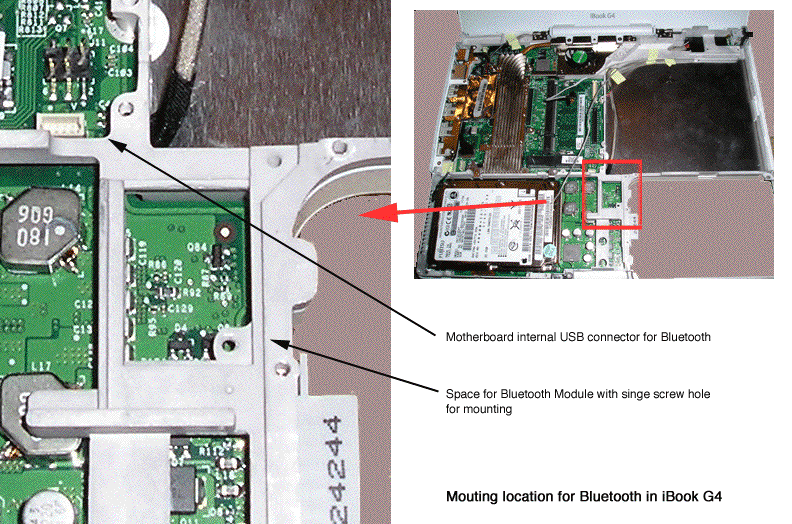
The rest of the Bluetooth installation was straightforward.
I took the BT module cable from the defunct PowerBook (it was much longer than required) and made the USB connection between the module and the motherboard in the iBook. I noticed on the PowerBook that the cable grounded to the case near the connection to the motherboard and that a convenient and unused screw hole also existed in the iBook near the motherboard connector, so the same was done with the iBook.
The antenna was slightly more trouble considering I certainly was not about to disassemble the iBook display to insert the antenna from the PoIrBook. Fortunately this was a very easy problem to solve. I took the AP Extreme/Bluetooth combo antenna array from the PoIrBook, removed the portion belonging solely to Bluetooth and ran it around the optical drive. The end was cleaned to expose wire and connected the internal metal housing.
The antenna was soon modified to connect it to the existing Airport Extreme antenna for greatly improved range. See update below for details.
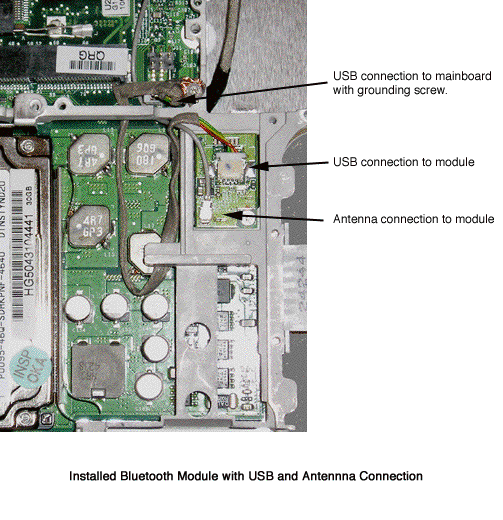
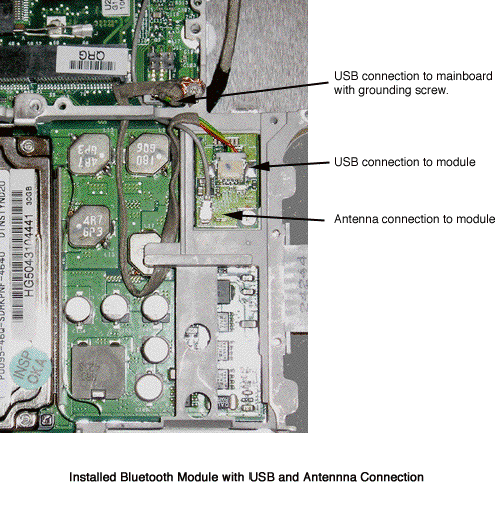
Limited testing shoId it was recognized by the machine, and had no trouble connecting to and using an Apple Bluetooth mouse and keyboard. More extensive testing, specifically range, will follow.
I previously mentioned, while the iBook was open I also replaced the hard drive with the 60 GB unit from the PowerBook and installed the PowerBook's DVD-RW to replace the iBook's combo drive.
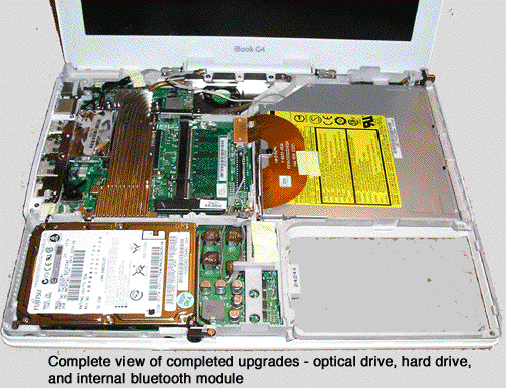
And Finished (except for changes as described below)
Considering that both Bluetooth and 802.11b/g operate in the 2.4Ghz range (801.11a operates in a higher range) and one antenna serves Bluetooth and Airport for my PowerBook G4 12 inch I think a good solution for range for this type of custom upgrade (and one I will certainly try soon) would be to simply connect the Bluetooth antenna lead to the existing Airport antenna by splicing it end to side. This antenna modification was subsequently performed with results discussed below.
The illustration below shows the pin outs I found for the OEM Bluetooh module and the iBook's internal (motherboard) USB connector. This information should be especially usefuol for those people modifying dongles.
Note that the interface is standard USB using a non-standard connector (I assume).
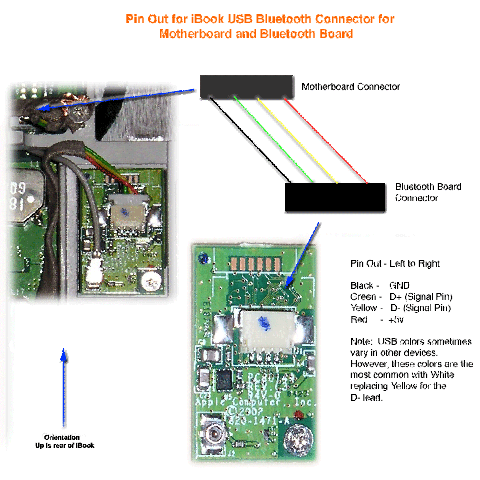
A larger version of this diagram is here as a separate file (gif).

Update: Antenna Modification for Improved BT Range
After a couple of weeks of use it was clear that the iBook's Bluetooth range was short, probably less than five feet. This was OK for mice and keyboards, but a little short for networking or pairing with the cell phone. This was easy to fix.
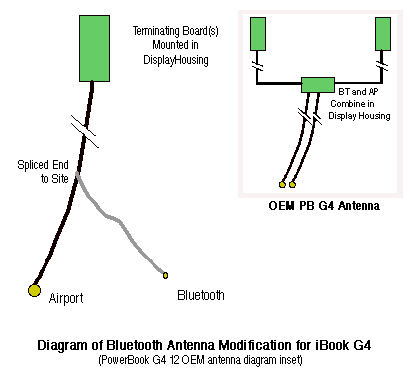
I had already noted that on my PoIrBook G4 12 inch there was really just one antenna that splits into two leads, one for airport and one for Bluetooth. The two antenna leads from BT and AP connected to a small circuit board just below the display (in the hinge) where they combine as a shared antenna that gives rise to two terminal leads that travel up both sides of the display to terminate on small circuit boards. This makes sense since they both operate at 2.4 GHz and therefore in reality just share a single antenna.
There I modified the newly "hacked on" BT antenna in the iBook and spliced it end-to-side into the Airport antenna taking care to only strip some insulation from the AP antenna and not transect it. The result was greatly increased Bluetooth range allowing me to pair with my cell phone placed in an adjacent room and with preserved (not shortened) Airport range. This modification is diagrammed below. This range after this modification seemed equal to the PowerBook G4's BT range. The iBook's AP range remained significantly better than the PowerBook's.
This provides a good way of affecting a working BT antenna using a disassembled BT dongle.
The new antenna connection is diagrammed below, along with a diagram of the OEM PowerBook antenna array.
Another user I corresponded with had acquired all the OEM parts required for internal iBook Bluetooth directly from a reseller, including the iBook Bluetooth antenna, and he sent me photos of the parts. (He has his own project page under construction so I will allow him to post them). From the photos the antenna in factory BT equipped iBook is clearly a distinct component from the factory installed Airport only antenna, which I found surprising.
Update: Interval Hard Drive Replacement
After approximately seven (7) months the 60 G hard drive salvaged from the pureed PowerBook began to fail, which was NOT surprising considering the fall ... and fall ...and fall ... and fall ... it took (my wife is thorough). Being in a cash reserve low point it was replaced with the cheapest 2.5 inch laptop drive I could find that also provided a little more room (increased from 60 G to 80 G). This drive was in no way billed as or mentioned iBook, Mac, or Apple compatibility. The drive, of course, worked fine, but I have not had time for battery life or benchmarking. My wife is out of town and I do not know the brand.
I mention the "unsupported" aspect for those readers who do not already know that Macs and PCs can use the same hard drives so looking for "Apple" supported drives is not necessary.
Macs and PCs use different file systems and reformatting may be necessary depending on the drives use. Boot drives in particular require different file systems for Macs and PCs. You might also note that Apple's are better at seeing PC drives than vice versa so if you want a to share a data drive between Macs and PCs a PC format is better, but check first since some file systems can only be read but not written by Macs without 3rd party software.
Results and Conclusions
With the significant help of having spare parts, such as the OEM BT module and mounting hardware, installing internal Bluetooth on an iBook G4 was easy.
The Bluetooth module worked as expected with range comparable to a normal PoIrBook (after the antenna mod) and the airport range did not appear to suffer from the shared antenna or any interference betIen wireless interfaces.
The trickiest part and the one that involved the largest "will it work?" question, the internal Bluetooth antenna, appeared to be easy to solved.
My guess it would be quite easy to remove the board from a typical USB Bluetooth dongle and mount it in the same location for those persons unwilling to lay waste to a $1500 laptop for a $50 part. At least one hobby site has a description where they mounted an external USB Bluetooth dongle internally but via a connection to the external USB port, although they mention changing to the internal port in the future. Using the internal port is a nice option if you know it is there.
The approach of get it working in the easiest way first (like via the external port) and then, when you know that works, trying more elaborate changes is the right approach. Whenever trying new hardware mods always minimize questions so the number of variables is reduced. For example, don't have questions like: Is this a USB port? Is the pin out correct? Do I need drivers? to be answered all at the same time.
Not surprisingly the SuperDiive and both hard drives (standard ATA devices) worked as expected in the iBook.
Counter Display Suspended by Page
Modified 11/3/04
Modified 11/6/04
Modified 11/19/04
Modified 11/29/04
Modified 11/30/04 - added reference to USB pin out (motherboard and BT board)
Modified 5/20/05 - integrated USB pin out into body, addition of OEM PB antenna diagram, 80 GB HD upgrade, and other smaller changes
Modified 7/28/05 - SE changes
Modifed
1/21/26 - slight cleanup