PM 8500 Cases – “Just In Case”
(This
was a case
of not realizing
you’re in shit
creek until you stop to tie your shoes)
Home Site
Map
Recent
Activity PM
8500 Project
Beige
G3 Project
My
Apples
|
|
Stock photo of
7200/7300/7500/7600 style System
identical to original 7200 as purchased. PM
8500
(mostly finished) was moved from the original desktop style 7200 case
with 150 W PS to side-of-road full sized ATX tower and PS and then to
new full sized ATX tower after several months.
The
first re-casing was complicated due to issues such as grounding, PS
adaptation, and hardware mounting which was easily adapted to the 2nd
case. Photos
of the 2nd
and current case and some hardware are on the PM 8500 Cases
page. |
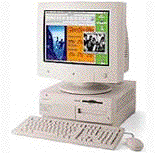
As the upgrades continued (mainly asking, how much stuff can I connect to this thing) the original 7500 Desktop-style case (shown above) became limiting. The original 7200 board had been swapped for an 8500 motherboard several years earlier as physically they were identical in size, shape, and the location of all connectors and mount points were the same. The case shipped with an internal HD, floppy, and CD ROM drive leaving one drive open suitable for a 3 1/2 or 5 1/4 drive not requiring front access (no CD Drives). The power supply was an odd shape and only 150 watts. A SCSI connector and power plug were present. These suggested limits on the number of internal components were quickly ignored in the interest of ever more. I removed the floppy and mounted a hard drive in its place. I then removed the mounting hardware from lower left bay and replaced it with custom plates allowing two HD’s to be placed in the slot meant for one. A small 2GByte 2.5-inch IDE drive from a laptop was wedged next to the PS. All told this allowed one CDRW/DVD drive, four full sized HD’s and one 2.5 HD to be placed internally, one of which as a SCSI 160 10k drive, along with a G4 upgrade card, and three PCI cards one of which was a 3 function combo card.
This made for a tentative PS situation as the case was running 6 drives instead of 4, one of which was fairly high power, a full load of PCI cards that in some ways was equivalent to 5, including a power hungry 3D video card, and a G4 CPU that certainly might have required much more power than the original 604 (or perhaps not). Added to that load was, at least, a Bluetooth adapter and scanner powered off the PCI USB card.
No
problems were
ever
encountered and nothing ever got particularly hot. The
system was stable often running for periods greater than
one month but I remained concerned about such a ridiculously low rated
PS.
About that time my girlfriend and I had a careful discussion, including a written cost benefit analysis, about exactly what kind of project computer might be best for her. She had located a rev A Beige G3 Mini-tower with a Sonnet G4 400 upgrade at a used computer store and wanted it. I pointed out how difficult and problematic those machines were, our existing surplus of memory, processor upgrades, etc that would work with a PowerSurge type but not with a Beige G3 and we decided that, despite her offer to give me the case and PS from the Beige, it was much more expensive for less initial power than another solution and we decided against it. The issue was decided and over. She bought the Beige G3 within the week, and told me somewhat later.
Not
wanting to
appear
ungrateful (or something) I triumphantly grabbed the case and power
supply and
proceeded to trot out across the flowing chunks.
I
assumed that some case modifications would be needed but I
hoped the motherboard mounts were interchangeable.
I also assumed that the power
supplies were interchangeable
since they were similar vintage Apples (and I assumed that power
supplies were
standard, or I just didn’t think about it at all).
Of note, my girlfriend
started moving the Beige to a
standard ATX tower and PS at the same time.
Case
modifications
and
getting the cables to length was tiring but went smoothly.
Mounting the motherboard was
exiting as
the Beige motherboard and the 8500 motherboard had no commonalities,
not
one.
The Beige case was nice in
that it held tons of drives, but was less than ideal because: 1) it was
ugly,
2) it was really, really heavy, 3) ugly, 4) to open it you had to hall
it into
the open, disconnect the AC power (no way to open it live, got to shut
down and
then power it back up), and fold it out where it takes up more room,
and
remained 5) ugly, 6) and then you cut your hands on the sharp edges.
I
began to suspect
more
serious obstacles than aesthetic ones when, after installing all my
components
and the motherboard, I went to connect up the installed Beige G3 power
supply
and, not to be fooled, noticed some subtle ques that hardware problems
lie
ahead.
Specifically that the power
connector on the Mac motherboard was a different size than the power
supply
one. Actually, the larger
motherboard power connector was
larger than the
only connector on the power supply,
which was much larger than the
other
motherboard connector.
Ever
suspicious I further noticed that, where the connectors did overlap,
the color
coding of the wires was different, hell the spectrum of colors was not
even the
same… in fact the colors of the standard four lead drive
power
connectors was
not even the same between the two Mac power supplies.
This was not good.
By
this point my
girlfriend
had the Beige in the case, all buttons and lights working, the system
booted
(using soft power) and had wandered off in search of something to
break, or an
abandoned computer onto which she could launch the terminal and type as
fast as
possible sudo followed by
random
words (but she was naked).
Clearly
the Beige G3 was an ATX system, on an ATX motherboard, and using an ATX
power supply,
and was totally different from my old Mac.
I
had not done
anything with
re-casing or power supplies before (just not common in the Mac world)
and knew
nothing at that point.
My quest to
get up to speed is discussed on The
8500
Genuine
Mac ATX Power Supply along with
a specific
discussion of getting a Mac
motherboard to control a PC (or new
Mac) Power
Supply.
After sufficient research and time I managed to rewire an ATX power supply (which turned out, coincidentally to be the one actually from the Beige G3), and after having all my IDE cables damaged by the Beige case decided this was just not worth it and reinstalled the entire system in the original Mac desktop case, odd shaped 150 watt power supply and all.
Unfortunately all had not survived. The onboard audio was gone. As I did listen to streams and music this was not acceptable but nothing I did had any effect on restoring the native sound (native sound was not completely functional with OS X but worked fine my me). The audio would sometimes clear up, then disappear for awhile, then come back for a bit convincing me that the problem had to be a floating ground. The old 7200 Mac case was a nightmare for PCI cards since the mounting was poor (no actual screwing them down) and they remained loose. I finally decided that those lose cards might be the grounding problem and re-cased it again, but this time in an old huge junk full-sized ATX tower with only one side panel. More importantly it was solid and open with lots and lots of room. I carefully mounted everything, no shortcuts, and also used the metal backing from the original case that clearly intended to ground the motherboard connectors to the case.
I
grounded
everything.
I grounded the grounds.
No
effect as the audio continued to
float.
I changed PCI cards, CPU
cards, tried multiple OS versions all the way back to 7.6.
The 8500 board had
motherboard AV
encoding circuitry but the adapter and soldered on ribbon cable had
long since
separated.
I used a 68 pin SCSI
cable and a modified 68 pin SCSI connector and, using a soldering iron
on the
smallest solder points I had ever personally delt with, soldered,
checked, confirmed and reconstructed
the entire adapter plus cable, and re-installed it.
No joy. I then
individually grounded every pin it, checked
out the AC plug
grounding, in fact checked everything in a blind obsession to find
this
problem which should have been trivial.
This
took
three weeks of time and
involved my figuring
out and building the
optional
Power Inverter to circuit to enable soft power
just in case that
might somehow
be the problem.
I even read about similar 8500 issues in which the author
had
tried to address a
sound problem by soldering a 12 gauge lead between the SCSI connector
housing
and the power supply housing with a blown mother board as a result and
I
even tried that anyway.
Never
any effect at all, just signal
float.
Finally,
out of
options and
with no available PCI slots, I began looking for any other option for
sound, and
found the iMic,
a $30
USB audio adapter that didn’t require drivers (used the
iMac’s digital speaker drivers), was fully function using all
normal OS controls
(which the built in audio was not) and took five minutes to install,
including
breaks.
I
spent three weeks
of heavy effort on a $30
five minute problem.
It
took another
week to
figure out USB bandwidth issues enough to minimize audio playback
problems.
The
8500 remained
in that
case working well for several months until, during temporary duty in my
office,
I put her in more attractive clothes (suitable business attire) in the
form of
a fairly nice new full sized ATX tower case with rapid release drive
mounts,
four low noise fans, a clear side panel, locks, and space for four 5
1/4 drives
with front access and six 3 1/2 drives two of which had front access if
necessary.
Since all the mounting
and power supply issues had already been addressed, special wiring
done,
etc…
the only real issue was
mounting the motherboard and as a result this case change took only an
single evening.
Photos
(mainly of
the newest
case) can be seen at PM 8500 Cases.
Counter Display Suspended by Page

Created
~8/20/04
Modified 10/24/04
Modified 06/17/05 - Counter Added